A refund does not put a product back on the shelf. Holiday returns management is both a customer experience priority and an inventory control task, and through Q4 the gap between a completed refund and sellable stock is where accuracy slips. A return is not operationally complete until the product has been identified, assessed and recorded against the right stock position.
Australia Post’s FY27 Q1 Quarterly eCommerce Update reports that 75% of shoppers say an easy returns process makes them more likely to buy again. Retailers need to make returns convenient while still accounting for the product that comes back.
During Q4, online orders, store purchases and promotions all feed into returns. A product may be returned to another store or need inspection, so the customer transaction can be complete while the inventory task remains open.
SKU reconciliation matches a returned product’s identifier, variant and quantity with its return transaction and inventory movement, so the stock record shows what the retailer holds and whether it is ready to sell.
This is the kind of gap a unified POS and OMS is built to close. Krisp Systems connects store transactions, customer orders and inventory in one view, so a return is recorded against the original sale and the stock position updates with it. The rest of this article looks at where holiday returns break down, and how a connected process keeps SKU accuracy intact through the season.
| Key takeaways • A return is not complete until the product is identified, assessed and recorded against the right SKU and stock position. •A refund reverses the payment. It does not confirm the item is ready to resell. •Holiday returns concentrate after Christmas, mostly in January, so plan reconciliation as carefully as the sales peak. •SKU reconciliation across POS, OMS and inventory is what keeps stock accurate through Q4. |
Why holiday returns create a second wave of stock movement
A sale moves stock to a customer. A return moves it back into the retailer’s network, sometimes through a different store, returns area or warehouse. Teams need to distinguish stock that has been received from stock that is ready for resale.
The US National Retail Federation and Happy Returns’ 2025 Retail Returns Landscape found that 17% of holiday sales were expected to be returned, and NRF notes the vast majority of returns occur in January. These are US benchmarks, not Australian rates, but they show why returns belong in seasonal operating plans.
Retailers need to identify each returned SKU, assess its condition and record its status and location. If the refund is recorded but the item is not reconciled, teams can end up with different views of the same stock.
A returned SKU is not automatically sellable stock
A refund confirms that the customer’s payment has been reversed or settled. It does not confirm that the product is suitable for resale. The item may be ready for the shelf, or it may need inspection, repair, transfer or another form of disposition.
For example, a customer returns a jacket bought online as a Christmas gift. The store accepts it, but staff still need to confirm the variant, inspect its condition and decide where it should be held. Until then, recording it as available could create an inaccurate promise to another customer.
In a connected platform like Krisp Systems, that jacket return starts from the original online order. The store records the return against the original sale, SKU and variant, then chooses where the stock goes. If the item is sent back to the shelf it becomes sellable again. If it is held for inspection it does not show as available until someone confirms its condition. The decision about resale stays with the store, and the stock record reflects it either way.
Retailers should define inventory states that match their processes, such as received, awaiting inspection, approved for resale, damaged or in transit. Labels vary, but the key distinction is between stock that has physically returned and stock that is available to sell.
Where retail returns and inventory records break down
- Product details do not match. The return is recorded against the wrong SKU, size, colour or quantity, distorting availability for the variant a customer wants.
- The refund and stock movement are confused. The financial transaction is complete, but the product may still be waiting for inspection or a location update.
- The return crosses channels. An online purchase is returned to a store, so teams need to connect the item with the original order and record where it was received.
- The item moves again. A product goes to a returns area, another store or a warehouse. If its location is not updated, the inventory record becomes unreliable.
These four failures share one root cause. The sale, the product and the stock record live in separate places, so a step gets missed or recorded twice. Connecting them is the point of a unified POS and OMS. When the return is tied to the original sale, counted against the right SKU and given a clear stock status in one system, each of these gaps has somewhere to close. Krisp Systems is designed to hold those records together so store teams are not reconciling them by hand.
The Australian Government’s business guidance recommends recording every sale and return, updating inventory records and completing regular stocktakes. Current records can help retailers identify frequently returned products, errors and faulty items.
How retailers can reconcile returned SKUs during peak season
A practical process connects the customer transaction, the physical product and its next inventory status. Retailers can adapt these five steps to their own policies.
- Identify the original sale or order. Capture the product identifier, variant, quantity and transaction or order reference.
- Record the reason and inspect the item. Check its condition, packaging and components against the retailer’s inspection rules.
- Determine the next status. Decide whether it can return to sellable inventory, needs inspection, is damaged or must move elsewhere.
- Update the stock record and location. Record where the item is held, and make it available only when it meets resale requirements.
- Reconcile the transaction and stock. Compare the return or exchange record with the item received and the resulting stock movement, and investigate missing quantities or unexplained adjustments.
For exchanges, record both the returned SKU and its replacement.
How returns work in Krisp POS
In Krisp Systems, these steps run as one workflow at the counter, from the original sale through to the refund and the stock update. The diagram below shows the path a return takes, including the decision that keeps held stock off the shelf.
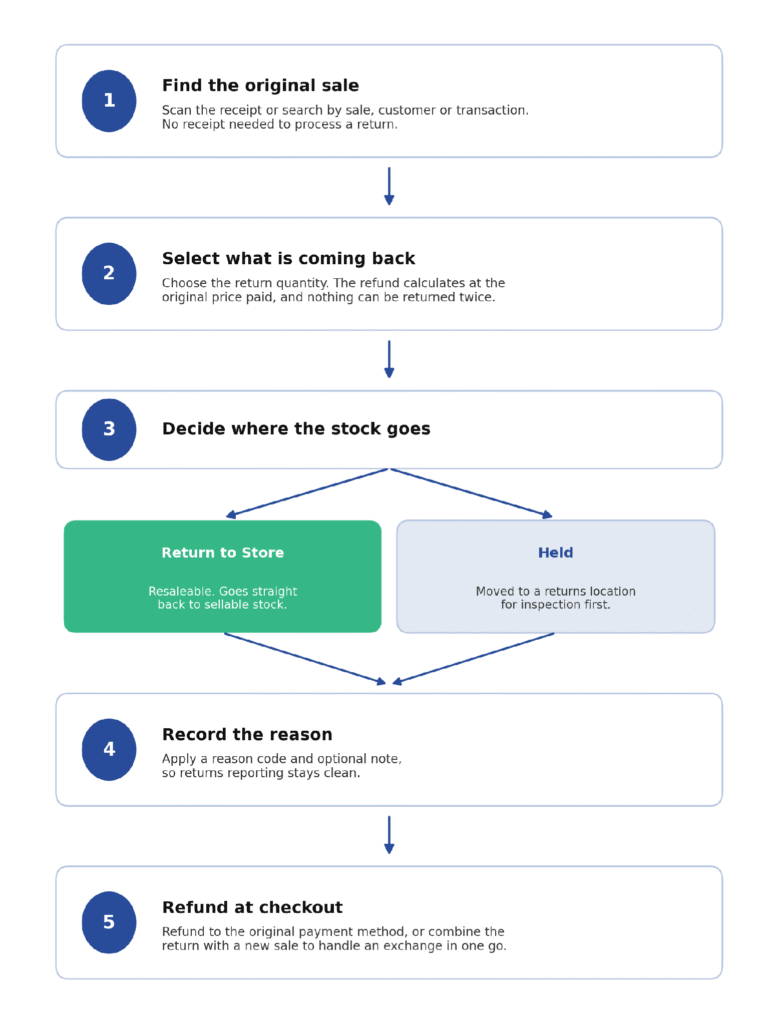
The returns workflow in Krisp POS, from finding the original sale to refunding and updating stock.
The key control is the stock decision. A returned item either goes back to sellable stock or is held for inspection first, so a faulty or opened product does not return to the shelf by accident. The return is written back against the original sale, which stops the same item being returned twice. Returns can also be processed at the counter when the connection drops, then confirmed automatically once the device is back online and the sale syncs.
Why POS, OMS and inventory visibility need to work together
POS records store transactions, an order management system (OMS) manages customer orders and fulfilment, and inventory records show quantities and locations. For cross-channel returns, these records need to connect the original order, the return and the product’s next movement.
Krisp Systems is a unified POS and OMS platform that connects store transactions, customer orders, inventory and fulfilment in one cloud view. Its OMS capabilities include order management by SKU or order, fulfilment allocation, inventory availability, and returns, refunds and payments, which help connect customer orders with the related operational activity.
A connected platform does not replace return policies, product inspection or accurate store processes. It provides a foundation for bringing transactions, orders, inventory and fulfilment into a more connected operational view. Retailers still define when an item is ready to sell.
Plan for the post-Christmas returns period
Returns concentrate after Christmas, when gift recipients have had time to inspect purchases and decide whether they need an exchange or refund. NRF notes the vast majority of holiday returns occur in January, so retailers should plan for this period as carefully as the sales peak.
Before peak trading, retailers can review staffing, clarify inspection responsibilities and check how online returns are handled in stores. After Christmas, reconciliation helps identify items awaiting inspection, stock in the wrong location and discrepancies to investigate.
A well-managed return is more than a refund. Its identity, condition, location and inventory status must also be clear.
Frequently asked questions
What is SKU reconciliation in retail returns management?
SKU reconciliation matches a returned product’s identifier and quantity with its return transaction and inventory movement, so the stock record reflects the item received and its current status.
Should returned products immediately be added back to available inventory?
No. A product should only be available for sale when it meets the retailer’s inspection and resale requirements. Items awaiting inspection or marked as damaged should be accounted for separately.
How does POS help with retail returns?
POS records store-level customer transactions, including sales and the financial activity associated with returns. Retailers also need to record the physical product and its inventory status.
Why does an OMS matter for omnichannel returns?
An OMS helps manage customer orders and fulfilment across channels. When an online purchase is returned in a store, order visibility helps connect the return to the original purchase and fulfilment history.
What should retailers reconcile after the holiday returns period?
Compare return and exchange records with original orders, SKU and variant details, quantities received, product condition, physical location and inventory updates, and investigate any differences.
Want a clearer view of how store transactions, customer orders and inventory move across your retail operation? Talk to the Krisp Systems team about connecting POS, orders, inventory, and fulfilment into one operational view.